Using MetaMask to Deposit and Send Digital Assets
Once you have set up MetaMask, sending and receiving supported digital assets is straightforward. In many blockchain transactions, you can send and receive digital assets directly to and from another wallet address. Depending on the transaction, banks, clearinghouses, credit card companies, or traditional payment processors may not be involved. However, if you buy digital assets through an exchange, stablecoin issuer, payment provider, or on-ramp service, those service providers may still be involved.
Deposit Digital Assets in MetaMask
When you approve Akemona to connect to your wallet, Akemona can view your public wallet address and request transaction approvals from your wallet. Akemona cannot move digital assets out of your wallet without your approval. If you have purchased digital assets, such as USDC stablecoin from Coinbase, Circle, or another supported provider, and want to deposit those assets into your MetaMask wallet, you will need to send them to your MetaMask public wallet address on the correct blockchain network.
To receive digital assets, log in to your MetaMask wallet, select the correct blockchain network, and copy your public wallet address. You may then paste that address into the withdrawal or transfer field on the platform from which you are sending the digital assets. You will receive the assets after the transaction is submitted and confirmed on the applicable blockchain network.
The important point to remember is that you must carefully verify your public wallet address and the blockchain network before sending any digital assets. If you send digital assets to the wrong address or on an unsupported network, the assets may be lost and may not be recoverable. Akemona recommends that you copy and paste the public wallet address instead of typing it manually, and then verify the address before submitting the transaction.
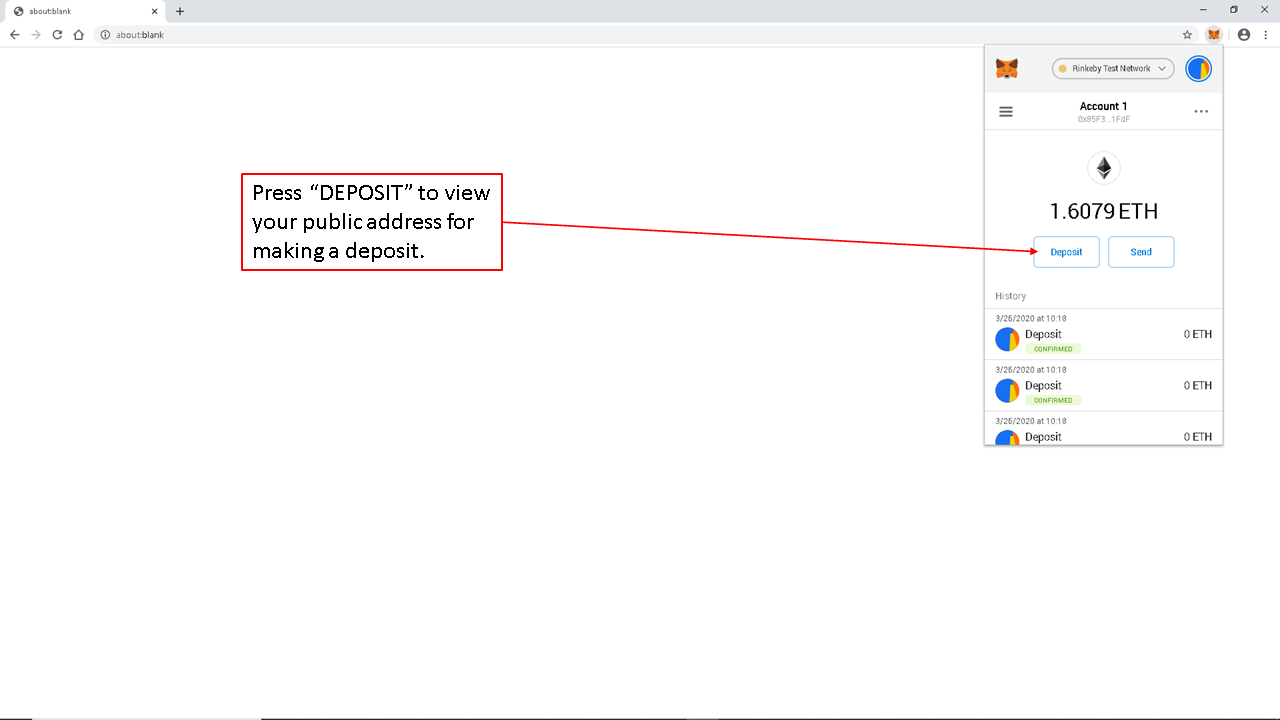
The picture below shows the “DEPOSIT” button. Press this button to view your public wallet address for making a deposit into your account.
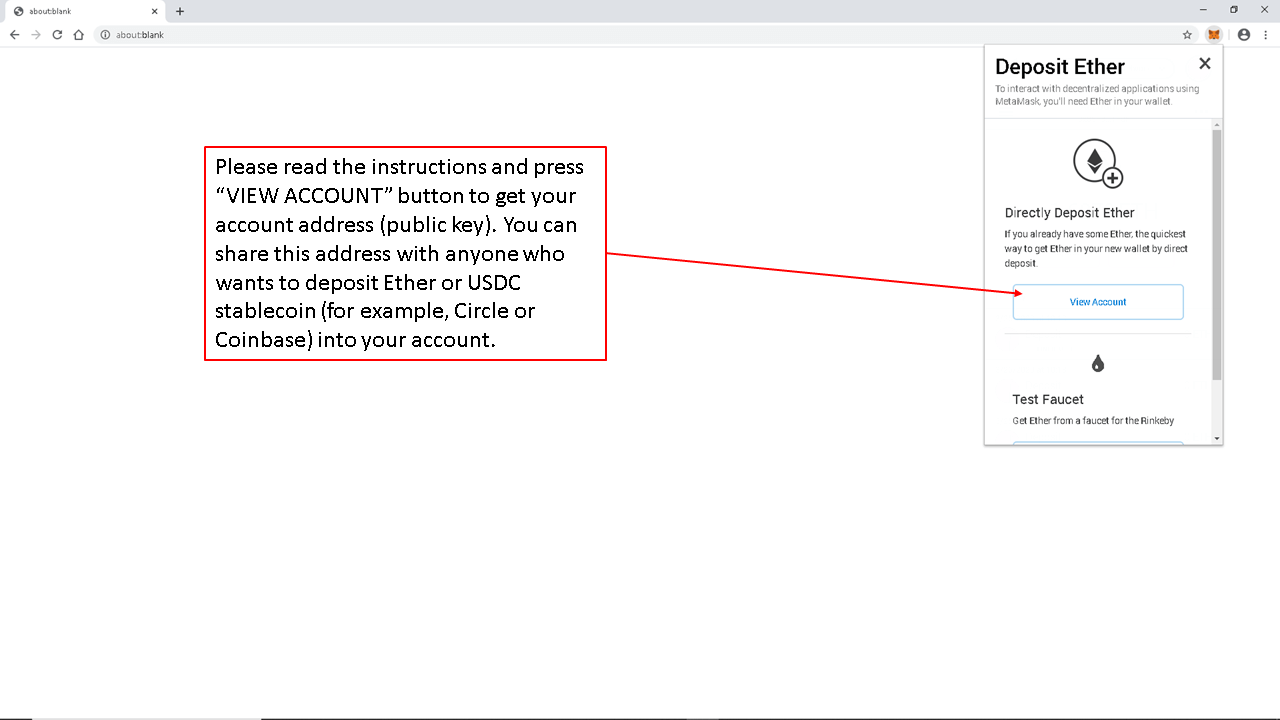
After clicking the “DEPOSIT” button, you will see this screen. Please review the instructions on the screen. Clicking the “VIEW ACCOUNT” button will display your public wallet address.
To deposit digital assets into this account from another platform, copy your public wallet address from MetaMask and paste it into the “transfer to,” “send to,” or “withdrawal address” field on the platform from which you are sending the assets. Once the transaction is executed by that platform and confirmed by the applicable blockchain network, your digital assets should appear in your MetaMask wallet.
Please note that MetaMask can receive ETH and many tokens that are compatible with supported blockchain networks, including ERC-20 tokens on Ethereum and compatible token standards on supported EVM networks. MetaMask should not be used to receive native Bitcoin into an Ethereum wallet address. Always confirm that the asset, blockchain network, and receiving address are supported before sending digital assets.
Sending Digital Assets Using MetaMask
If you need to send digital assets from your MetaMask wallet to someone else, there are several ways to do it. The most common method is to send the asset to the recipient’s public wallet address. Before sending, confirm that the recipient has provided the correct wallet address and that the asset is being sent on the correct blockchain network.
When Akemona requests a payment or transaction from your MetaMask wallet, MetaMask will ask you to review and approve the transaction. Akemona cannot withdraw digital assets from your wallet unless you approve the transaction in MetaMask. For tokenized securities or other regulated offerings, Akemona may require investors to complete identity verification, investor eligibility checks, wallet registration, and subscription workflows before allowing payment or token delivery. These steps help ensure that tokenized securities are issued only to eligible investors and that ownership records are properly maintained.
For your protection, you should not send USDC or any other digital asset directly to a smart contract or wallet address unless the Akemona platform or the issuer has specifically instructed you to do so and you have verified the address through the official platform. Sending digital assets directly to the wrong address or outside the approved investment workflow may result in loss of funds or failure to complete the investment.
When sending digital assets directly to another person, Akemona recommends that you first send a small test amount and ask the recipient to confirm receipt. After receiving confirmation, you can send the remaining amount to the same address. If you want additional confirmation that the recipient controls the wallet address, you may ask the recipient to return the small test amount. If the recipient can successfully return the digital asset, that provides additional confirmation that the recipient controls the wallet address.
When you are ready to send, start the process by clicking the “SEND” button, as shown below:
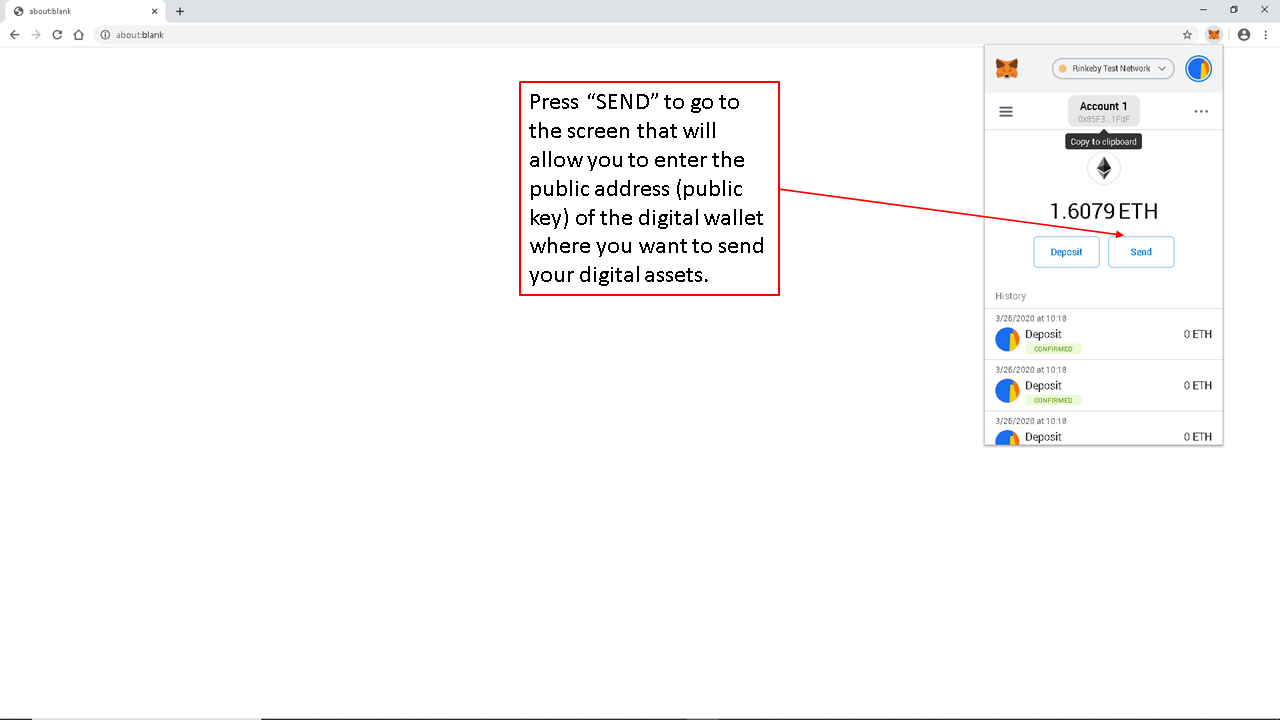
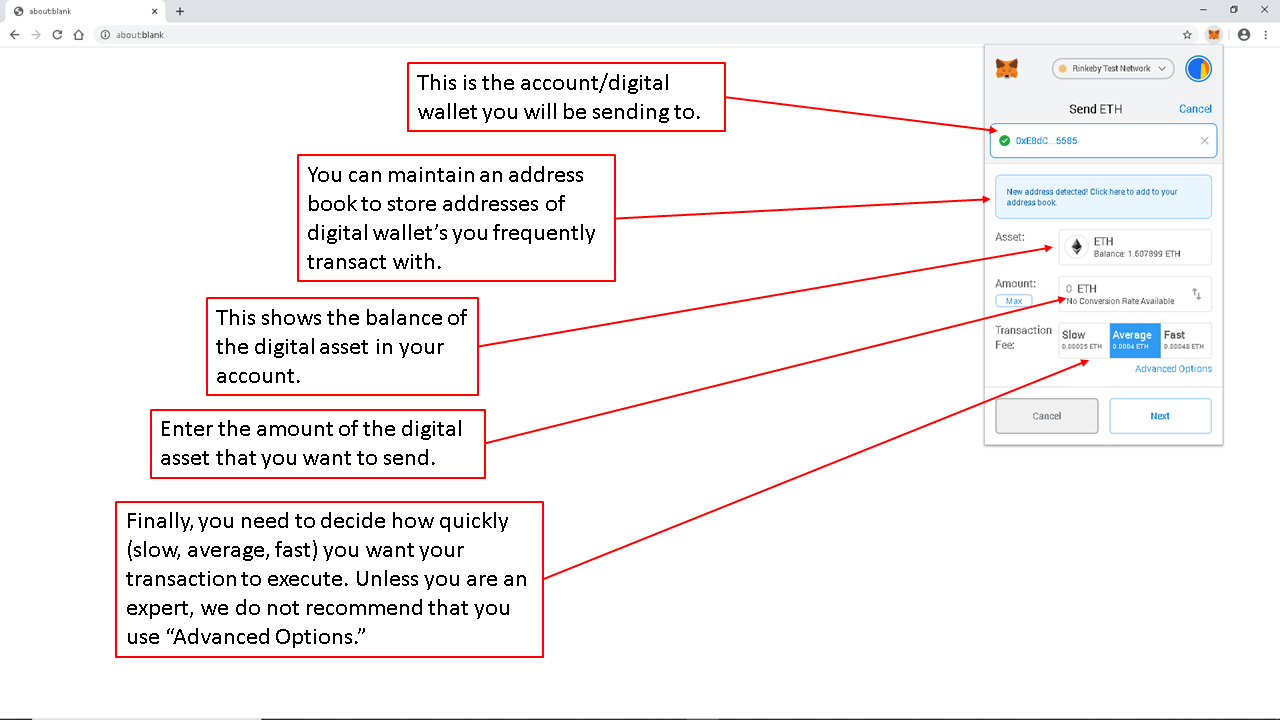
You are almost ready to send ETH or another supported digital asset on this screen. Select the account from which you want to send digital assets. Enter the public wallet address of the recipient. We recommend that you copy and paste the public wallet address instead of typing it manually. If you make a typing error, you may send your digital assets to the wrong address, and the transaction may not be reversible.
Enter the amount you want to send and review the transaction fee. The transaction fee, commonly called gas, may vary based on the blockchain network, network demand, and transaction complexity. Once you have entered and reviewed these details, click the “NEXT” button.
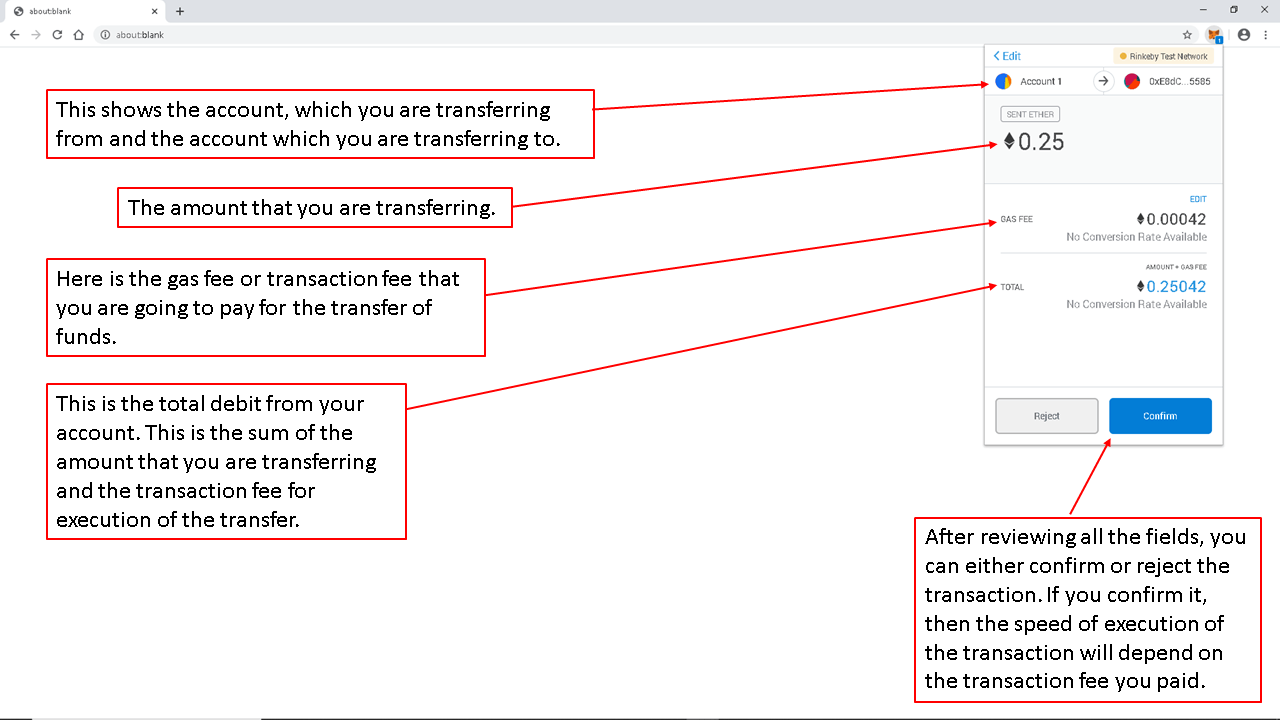
This is the MetaMask confirmation screen. Carefully review the recipient address, asset, amount, network, and transaction fee before confirming. The transaction will be submitted for processing after you click the “CONFIRM” button.
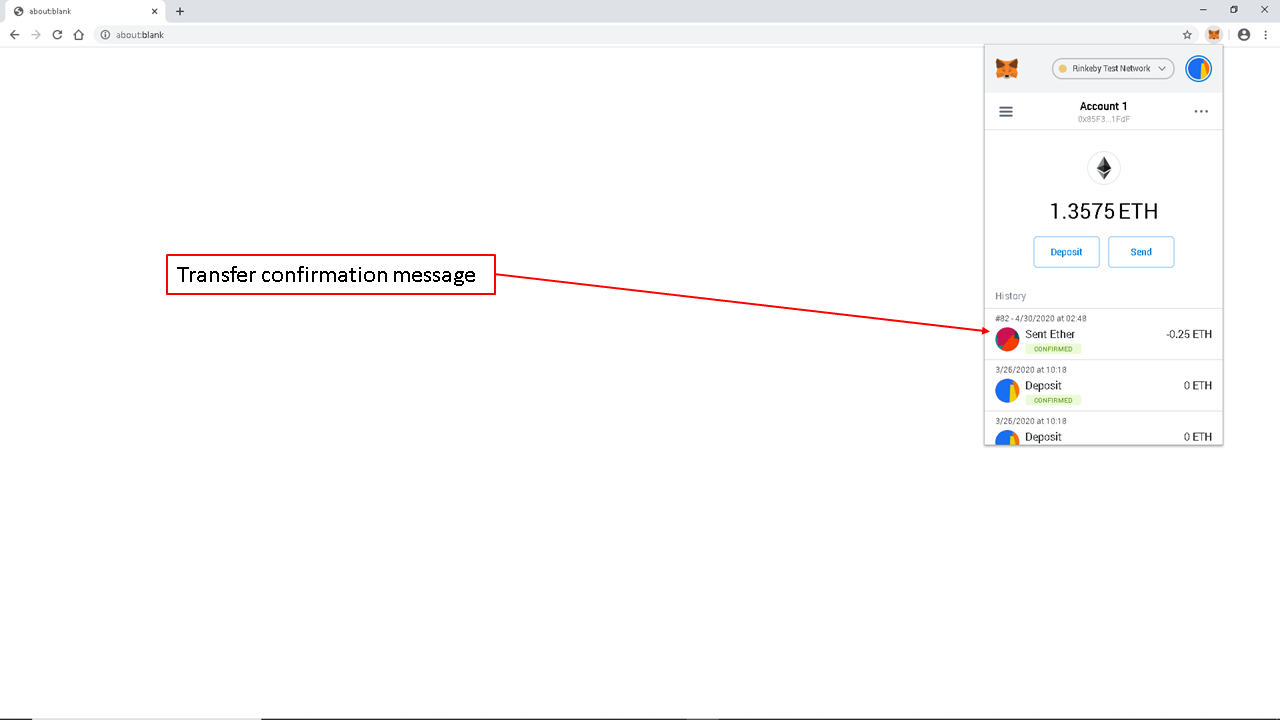
After the transfer of digital assets is confirmed on the blockchain, you will see a confirmation message.